
Pricing adjustments made to items selected in the app on the Component, Accessory, Add-Ons, and Material Tabs display in columns X - AD. (Fig. 1)
- Total Price is the price of the selected item AFTER discounts and pricing adjustments.
- NC $: Net Change amount is the difference between the list price and the total price.
- The Finance Fee (Fin. Fee) is the actual finance fee incurred by the item AFTER the Net Change is applied.
- Pricing adjustments made to a preconfigured system selected on the system tab appear as a separate line item. "System Allocation".
- The Finance Fee Adj. if a down payment is given will appear as a separate line item; "Down Payment Finance Fee Adj."
Hidden Column Note: The Financing Fee Adjustment is a hidden column. The adjustment is the difference between the Est. Finance Fee (Column V) and the Fin. Fee (Column AD). The Finance Fee adjustment is made after the net change and the down payment are applied.
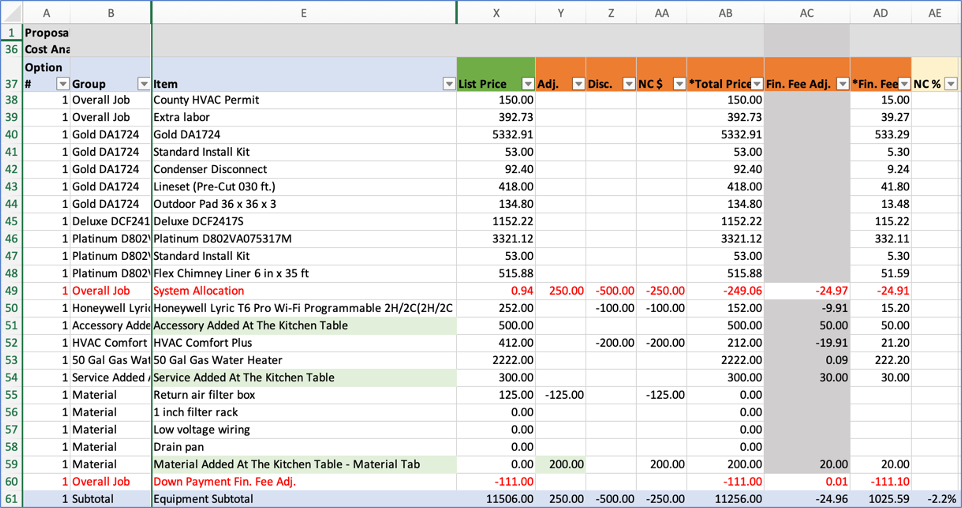
Figure 1. Pricing Adjustments made to items selected in the app and hidden column fin. fee adj.
| Group 2 - List Price Calculations |  |
 |
Group 4 - Net Change and Gross Margin |
Comments
0 comments
Please sign in to leave a comment.