
Columns L thru X display the values used in the List Price Calculations. List Price (Column X) is the price that displays in the app before any discounts or pricing adjustments have been applied while building the quote. The cost of the item, all business rule calculations, and the selected finance program dealer fee are included in the List Price (Fig. 1).
- Accessories and Add-Ons that have been added "on the fly" while building a quote have $0 cost. In this case, the gross margin $ will be the same as the cash price.
- Material tab items added "on the fly" while building a quote have $0 cost. These items are treated as pricing adjustments and will display in the Adj column. (Column Y)
- Note your export may have a different number of columns. Each column represents a business rule. You may have more or fewer business rules than this example has.
The Cost Analysis worksheet will export with hidden columns. There are 3 hidden columns in this group. Hidden Columns (Fig. 2):
- The Cash Price (column U) that displays in the app will contain adjustments for rounding. Column T displays Cash Price Rounding.
- If financing has been selected for an option, column V displays the Estimated Finance fee. The final finance fee will display in Column AD after adjustments and discounts are applied.
- Rounding Adjustments to the Finance Price appear in Column W.
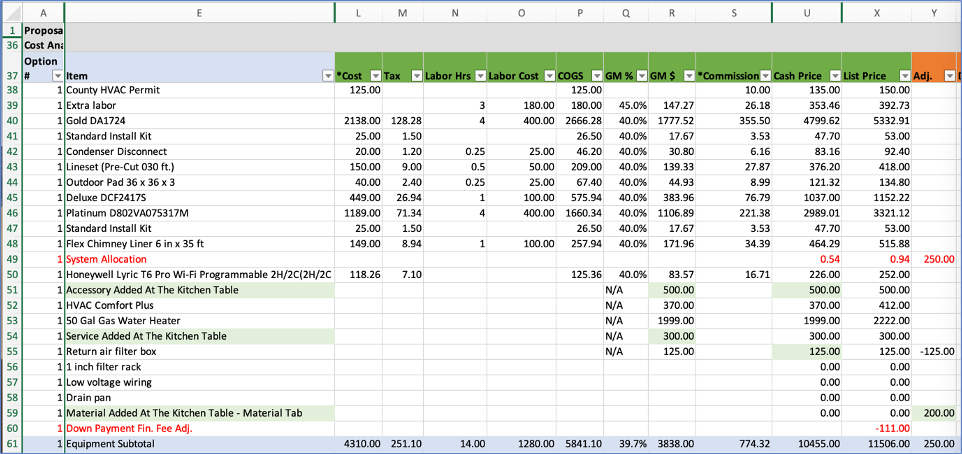
Figure 1. List Price calculations.
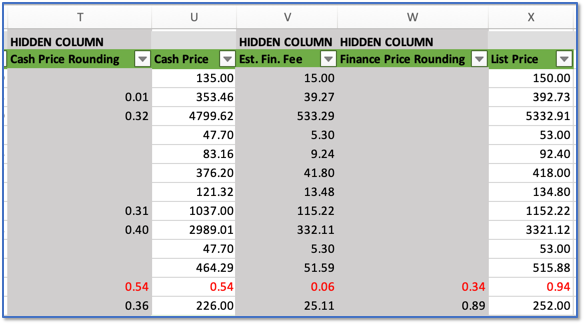
Figure 2. Cost Analysis Worksheet will export with 3 Hidden columns.
Excel Tips:
Hide columns and rows that you don't need to see. (How to hide or show columns and rows in excel link)
Advice: Don't hide column A or Row 1 - unhiding column A and row 1 can be tricky. (How to unhide first column or row in excel link)
| Group 1 - Install Material export Headers |  |
 |
Group 3 - Adjustments,Discounts and Finance Fee |
Comments
0 comments
Please sign in to leave a comment.